Actions
Bug #1489
open

Popup Background Transparency Issue Causing Text Overlap on Verification Screen
Start date:
04/08/2026
Due date:
% Done:
0%
Estimated time:
Description
Description
On the Verification Code screen, the background of Send OTP and Session Expired popups is semi-transparent. Due to this transparency, the popup content visually overlaps with underlying screen elements (e.g., Continue button text)
Steps to Reproduce
- Navigate to the Verification Code (OTP) screen
- Trigger Send OTP popup or Session Expired popup
- Observe the popup appearance
Actual Result
- Popup background is transparent
- Underlying screen elements (e.g., Continue button text) are visible through it
- Text appears merged/unclear
Expected Result
- Popup should have a solid or properly dimmed background
- Underlying content should not interfere with popup readability
- Text should be clearly visible and readable
Files
 Updated by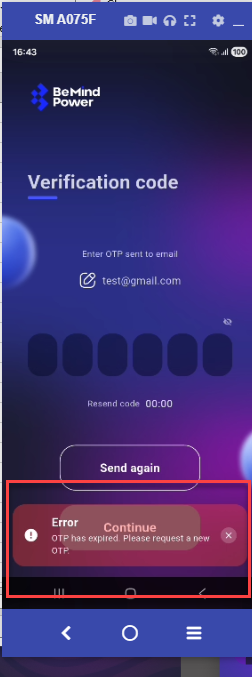
Actions